Base64 Encoder / Decoder
File to Base64
Note: Large files may be slow in the browser.
What is a Base64 Encoder/Decoder?
Our free Base64 encoder and decoder allows you to convert text, files, or images to and from Base64 format instantly. Base64 is a binary-to-text encoding scheme that represents binary data in an ASCII string format using 64 characters (A-Z, a-z, 0-9, +, /). It's widely used for embedding data in HTML/CSS, transmitting attachments in emails (via MIME), or handling data in APIs and JSON without corruption. Try our URL Encoder for URL-safe Base64.
Why use our tool? It's 100% browser-based, private (no data leaves your device), and supports encoding files like images or documents. No sign-up or installation required – just paste your text or upload a file and get results in seconds. Perfect for developers testing payloads, embedding images in CSS, or converting data for web apps.
How Base64 Encoding Works
Base64 takes binary data (like "Hi\n") and converts it to printable characters. For example:
- ASCII Text: "Hi\n"
- Binary: 01001000 01101001 00001010
- Base64: "SGkK"
This ensures data integrity over text-only channels, but adds ~33% size overhead. For URL-safe encoding, replace '+' with '-', '/' with '_', and remove '=' padding.
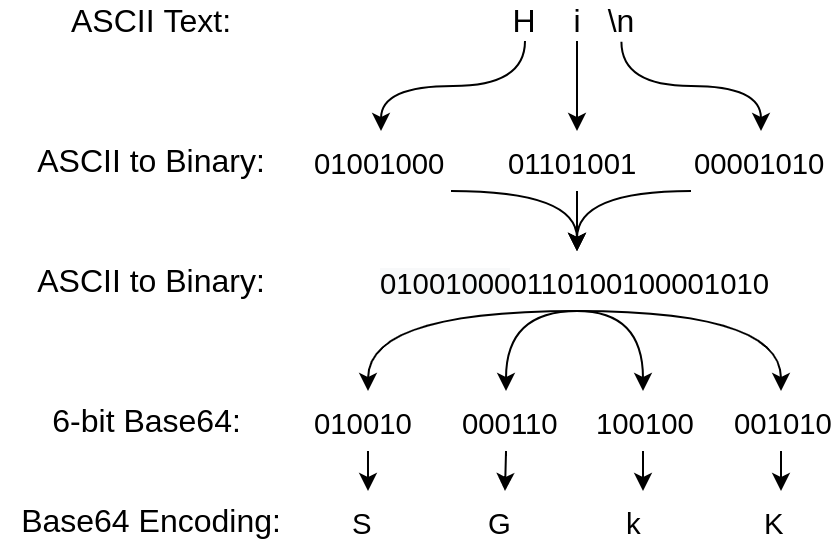
Source: Red Hat (example diagram)
Common Use Cases
- Encode files to Base64 for data URIs in HTML:
data:image/png;base64,iVBORw0KGgoAAAANSUhEUgAA... - Decode Base64 strings from APIs or logs.
- Test email attachments or XML/JSON data.
If you're dealing with large files, note that browser performance may vary – for bulk encoding, consider desktop tools. Check our JSON Formatter for related API tasks.
Frequently Asked Questions
- What is Base64 encoding?
- Base64 is a binary-to-text encoding scheme that converts binary data into an ASCII string format using 64 printable characters. It's commonly used for transmitting data over text-based media like email or APIs without corruption.
- Is Base64 secure?
- No. It’s an encoding, not encryption. Don’t use it to hide secrets.
- When should I use Base64?
- Use it for small inline assets or test payloads. Large files can be inefficient.
- Why is the output larger?
- Base64 adds ~33% overhead compared to binary files.
- Can I copy the result?
- Yes—use the copy button or select all and copy.
- How to encode a file to Base64?
- Upload your file using the 'File to Base64' section, click 'Encode File', and get the data URL instantly. Supports images, text files, and more.
- What's the difference between Base64 and URL-safe Base64?
- URL-safe Base64 replaces '+' with '-', '/' with '_', and omits '=' padding to make it safe for URLs. Use it for web links or APIs.
- Can I decode Base64 back to original file?
- Yes, paste the Base64 string into the output field and click 'Decode'. For files, save the decoded data with the original extension.
- Does this tool support MIME or UTF-8?
- Yes, it handles UTF-8 text and MIME-compatible encoding. For custom options like line splitting, consider advanced tools.